
Giới thiệu
Trong thế giới giao dịch tài chính hiện đại, robot giao dịch tự động (Trading Bot) không còn là đặc quyền của các quỹ đầu tư lớn. Với Python — ngôn ngữ lập trình phổ biến nhất thế giới — bất kỳ trader nào cũng có thể xây dựng hệ thống giao dịch tự động, kết nối trực tiếp với MetaTrader 4 (MT4) và MetaTrader 5 (MT5).
Bài viết này sẽ hướng dẫn bạn từ A đến Z cách lập trình robot giao dịch bằng Python, bao gồm:
- Kiến trúc tổng thể hệ thống
- Kết nối Python với MT4 và MT5
- Lấy dữ liệu thị trường real-time
- Tính toán tín hiệu giao dịch
- Đặt lệnh và quản lý vị thế tự động
- Quản lý rủi ro và tối ưu hóa
1. Tại Sao Chọn Python Cho Trading Bot?
1.1. Ưu điểm vượt trội
| Tiêu chí | Python | MQL5 | C++ |
|---|---|---|---|
| Độ dễ học | ⭐⭐⭐⭐⭐ | ⭐⭐⭐ | ⭐⭐ |
| Thư viện Data Science | Rất phong phú | Hạn chế | Trung bình |
| Machine Learning | Tích hợp sẵn | Không có | Phức tạp |
| Backtesting | Linh hoạt | Tích hợp MT5 | Tự xây dựng |
| Kết nối đa sàn | Binance, MT5, SSI… | Chỉ MT4/MT5 | Tùy chỉnh |
| Tốc độ thực thi | Trung bình | Nhanh | Rất nhanh |
1.2. Hệ sinh thái thư viện mạnh mẽ
# Các thư viện quan trọng cho Trading Bot
import MetaTrader5 as mt5    # Kết nối MT5
import pandas as pd           # Xử lý dữ liệu
import numpy as np            # Tính toán số học
import ta                     # Technical Analysis indicators
from sklearn.ensemble import RandomForestClassifier  # ML
import schedule               # Lập lịch tự động
Python cho phép bạn kết hợp sức mạnh của Data Science, Machine Learning và Trading trong cùng một hệ thống — điều mà MQL5 không thể làm được.
2. Kiến Trúc Hệ Thống Python – MT4/MT5
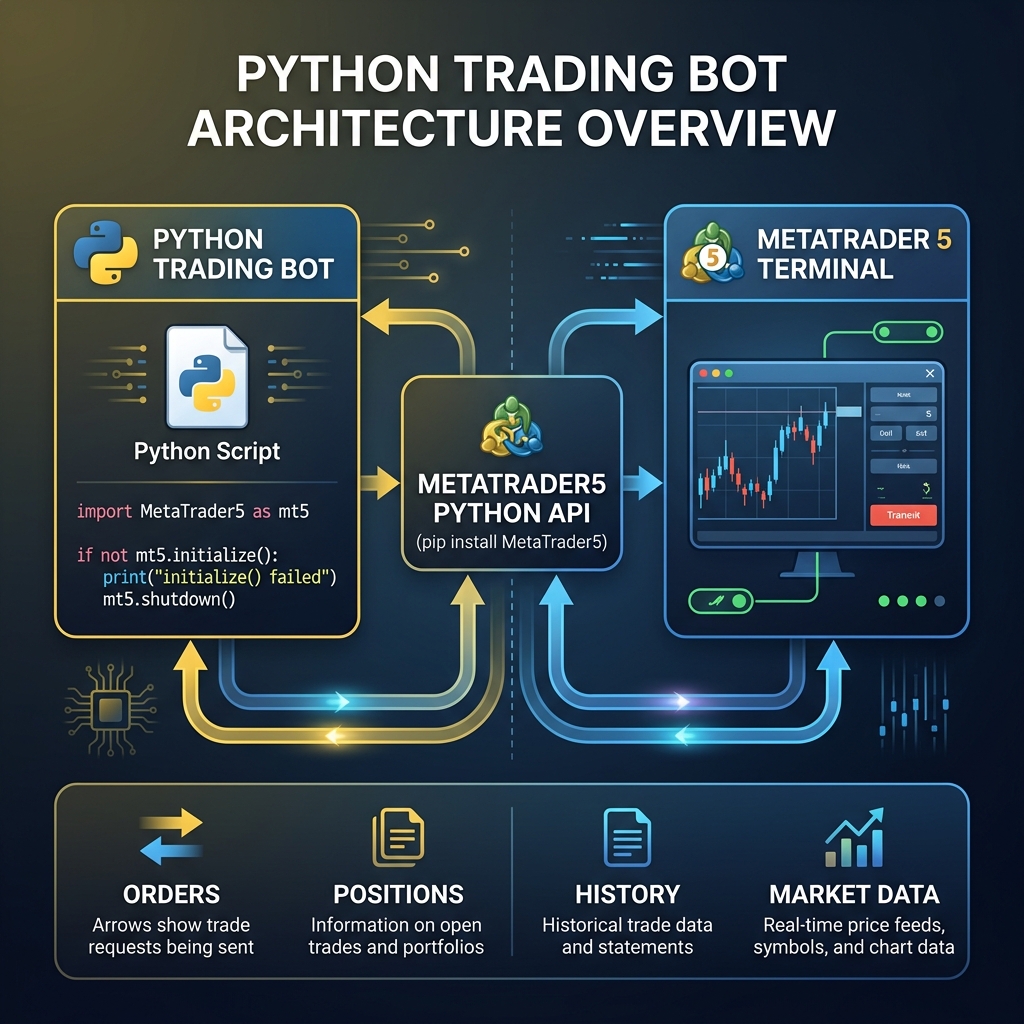
2.1. Sơ đồ kiến trúc tổng thể
Hệ thống gồm 3 tầng chính:
Tầng 1 – Data Layer (Thu thập dữ liệu):
- Kết nối MT5 Terminal qua thư viện
MetaTrader5
- Lấy dữ liệu OHLCV (Open, High, Low, Close, Volume)
- Lấy thông tin tài khoản, vị thế, lịch sử giao dịch
Tầng 2 – Logic Layer (Xử lý tín hiệu):
- Tính toán chỉ báo kỹ thuật (RSI, MACD, EMA, Bollinger Bands…)
- Áp dụng mô hình Machine Learning (nếu có)
- Tạo tín hiệu BUY/SELL dựa trên chiến lược
Tầng 3 – Execution Layer (Thực thi lệnh):
- Gửi lệnh mua/bán qua
mt5.order_send()
- Quản lý Stop Loss, Take Profit
- Trailing Stop và Break-even tự động
2.2. Kết nối Python với MT5
import MetaTrader5 as mt5

# Khởi tạo kết nối MT5
def connect_mt5(login, password, server):
    """Kết nối Python với MT5 Terminal"""
    if not mt5.initialize():
        print(f"MT5 initialize failed: {mt5.last_error()}")
        return False

    authorized = mt5.login(
        login=login,
        password=password,
        server=server
    )

    if authorized:
        account_info = mt5.account_info()
        print(f"✅ Kết nối thành công!")
        print(f"   Tài khoản: {account_info.login}")
        print(f"   Tên: {account_info.name}")
        print(f"   Balance: ${account_info.balance:,.2f}")
        print(f"   Equity: ${account_info.equity:,.2f}")
        print(f"   Server: {account_info.server}")
        return True
    else:
        print(f"❌ Đăng nhập thất bại: {mt5.last_error()}")
        return False

# Sử dụng
connect_mt5(
    login=12345678,
    password="your_password",
    server="Exness-MT5Real"
)
2.3. Kết nối Python với MT4 (qua ZeroMQ Bridge)
MT4 không có thư viện Python chính thức, nhưng có thể kết nối qua ZeroMQ DWX Bridge:
# MT4 cần cài EA "DWX_ZeroMQ_Server" trên chart
import zmq

class MT4Bridge:
    def __init__(self, push_port=32768, pull_port=32769):
        self.context = zmq.Context()

        # PUSH socket - gửi lệnh đến MT4
        self.push_socket = self.context.socket(zmq.PUSH)
        self.push_socket.connect(f"tcp://localhost:{push_port}")

        # PULL socket - nhận dữ liệu từ MT4
        self.pull_socket = self.context.socket(zmq.PULL)
        self.pull_socket.connect(f"tcp://localhost:{pull_port}")

    def send_order(self, symbol, order_type, lots, sl=0, tp=0):
        """Gửi lệnh giao dịch đến MT4"""
        command = f"TRADE|OPEN|{order_type}|{symbol}|{lots}|{sl}|{tp}"
        self.push_socket.send_string(command)
        response = self.pull_socket.recv_string()
        return response

# Sử dụng
bridge = MT4Bridge()
bridge.send_order("XAUUSD", "BUY", 0.01, sl=2300.0, tp=2400.0)
3. Lấy Dữ Liệu Thị Trường Real-time
3.1. Lấy dữ liệu nến (OHLCV)
import MetaTrader5 as mt5
import pandas as pd
from datetime import datetime

def get_ohlcv(symbol, timeframe, num_bars=500):
    """Lấy dữ liệu nến từ MT5"""

    # Mapping timeframe
    tf_map = {
        'M1': mt5.TIMEFRAME_M1,
        'M5': mt5.TIMEFRAME_M5,
        'M15': mt5.TIMEFRAME_M15,
        'M30': mt5.TIMEFRAME_M30,
        'H1': mt5.TIMEFRAME_H1,
        'H4': mt5.TIMEFRAME_H4,
        'D1': mt5.TIMEFRAME_D1,
    }

    rates = mt5.copy_rates_from_pos(
        symbol,
        tf_map[timeframe],
        0,          # Bắt đầu từ nến hiện tại
        num_bars    # Số nến cần lấy
    )

    if rates is None:
        print(f"❌ Không lấy được dữ liệu {symbol}")
        return None

    df = pd.DataFrame(rates)
    df['time'] = pd.to_datetime(df['time'], unit='s')
    df.set_index('time', inplace=True)

    print(f"✅ Lấy {len(df)} nến {symbol} {timeframe}")
    return df

# Sử dụng
df_gold = get_ohlcv("XAUUSD", "H1", 500)
print(df_gold.tail())
3.2. Lấy giá real-time (Tick Data)
def get_realtime_price(symbol):
    """Lấy giá Bid/Ask real-time"""
    tick = mt5.symbol_info_tick(symbol)
    if tick:
        return {
            'symbol': symbol,
            'bid': tick.bid,
            'ask': tick.ask,
            'spread': round((tick.ask - tick.bid) * 100, 1),
            'time': datetime.fromtimestamp(tick.time)
        }
    return None

# Ví dụ
price = get_realtime_price("XAUUSD")
print(f"Gold: Bid={price['bid']}, Ask={price['ask']}, Spread={price['spread']} pips")
4. Tính Toán Tín Hiệu Giao Dịch
4.1. Tính toán chỉ báo kỹ thuật
import ta  # pip install ta

def calculate_indicators(df):
    """Tính toán các chỉ báo kỹ thuật phổ biến"""

    # RSI (Relative Strength Index)
    df['rsi'] = ta.momentum.RSIIndicator(df['close'], window=14).rsi()

    # MACD
    macd = ta.trend.MACD(df['close'])
    df['macd'] = macd.macd()
    df['macd_signal'] = macd.macd_signal()
    df['macd_histogram'] = macd.macd_diff()

    # EMA (Exponential Moving Average)
    df['ema_20'] = ta.trend.EMAIndicator(df['close'], window=20).ema_indicator()
    df['ema_50'] = ta.trend.EMAIndicator(df['close'], window=50).ema_indicator()
    df['ema_200'] = ta.trend.EMAIndicator(df['close'], window=200).ema_indicator()

    # Bollinger Bands
    bb = ta.volatility.BollingerBands(df['close'], window=20)
    df['bb_upper'] = bb.bollinger_hband()
    df['bb_lower'] = bb.bollinger_lband()
    df['bb_middle'] = bb.bollinger_mavg()

    # ATR (Average True Range) - đo biến động
    df['atr'] = ta.volatility.AverageTrueRange(
        df['high'], df['low'], df['close'], window=14
    ).average_true_range()

    return df

df_gold = calculate_indicators(df_gold)
4.2. Chiến lược giao dịch mẫu: EMA Crossover + RSI Filter
def generate_signal(df):
    """
    Chiến lược: EMA 20/50 Crossover + RSI Filter
    - BUY:  EMA20 cắt lên EMA50 + RSI < 70
    - SELL: EMA20 cắt xuống EMA50 + RSI > 30
    """
    signals = []

    for i in range(1, len(df)):
        signal = 'HOLD'

        # EMA Crossover
        ema20_prev = df['ema_20'].iloc[i-1]
        ema50_prev = df['ema_50'].iloc[i-1]
        ema20_curr = df['ema_20'].iloc[i]
        ema50_curr = df['ema_50'].iloc[i]
        rsi = df['rsi'].iloc[i]

        # Golden Cross (BUY)
        if ema20_prev <= ema50_prev and ema20_curr > ema50_curr:
            if rsi < 70:  # Không mua khi RSI quá cao
                signal = 'BUY'

        # Death Cross (SELL)
        elif ema20_prev >= ema50_prev and ema20_curr < ema50_curr:
            if rsi > 30:  # Không bán khi RSI quá thấp
                signal = 'SELL'

        signals.append(signal)

    df = df.iloc[1:].copy()
    df['signal'] = signals
    return df

df_signals = generate_signal(df_gold)
buy_signals = df_signals[df_signals['signal'] == 'BUY']
print(f"📊 Tổng số tín hiệu BUY: {len(buy_signals)}")
5. Đặt Lệnh và Quản Lý Vị Thế
5.1. Hàm đặt lệnh hoàn chỉnh
def send_order(symbol, order_type, lots, sl_points=0, tp_points=0, comment="PythonBot"):
    """
    Đặt lệnh giao dịch trên MT5
    - symbol: "XAUUSD", "EURUSD"...
    - order_type: "BUY" hoặc "SELL"
    - lots: khối lượng (0.01, 0.1, 1.0...)
    - sl_points, tp_points: SL/TP tính theo points
    """
    symbol_info = mt5.symbol_info(symbol)
    if symbol_info is None:
        print(f"❌ Symbol {symbol} không tồn tại")
        return None

    if not symbol_info.visible:
        mt5.symbol_select(symbol, True)

    tick = mt5.symbol_info_tick(symbol)
    point = symbol_info.point

    if order_type == "BUY":
        price = tick.ask
        sl = price - sl_points * point if sl_points else 0.0
        tp = price + tp_points * point if tp_points else 0.0
        trade_type = mt5.ORDER_TYPE_BUY
    else:
        price = tick.bid
        sl = price + sl_points * point if sl_points else 0.0
        tp = price - tp_points * point if tp_points else 0.0
        trade_type = mt5.ORDER_TYPE_SELL

    request = {
        "action": mt5.TRADE_ACTION_DEAL,
        "symbol": symbol,
        "volume": lots,
        "type": trade_type,
        "price": price,
        "sl": sl,
        "tp": tp,
        "deviation": 20,
        "magic": 123456,
        "comment": comment,
        "type_time": mt5.ORDER_TIME_GTC,
        "type_filling": mt5.ORDER_FILLING_IOC,
    }

    result = mt5.order_send(request)

    if result.retcode == mt5.TRADE_RETCODE_DONE:
        print(f"✅ Lệnh {order_type} {lots} lots {symbol} @ {price}")
        print(f"   SL: {sl}, TP: {tp}")
        print(f"   Order ticket: {result.order}")
        return result
    else:
        print(f"❌ Lỗi đặt lệnh: {result.retcode} - {result.comment}")
        return None
5.2. Quản lý vị thế tự động
def manage_positions(symbol, trailing_points=500):
    """Trailing Stop tự động cho các vị thế đang mở"""
    positions = mt5.positions_get(symbol=symbol)

    if positions is None or len(positions) == 0:
        return

    point = mt5.symbol_info(symbol).point

    for pos in positions:
        tick = mt5.symbol_info_tick(symbol)

        if pos.type == mt5.ORDER_TYPE_BUY:
            # Vị thế BUY: di chuyển SL lên khi giá tăng
            new_sl = tick.bid - trailing_points * point
            if new_sl > pos.sl and new_sl > pos.price_open:
                modify_sl(pos.ticket, new_sl, pos.tp)

        elif pos.type == mt5.ORDER_TYPE_SELL:
            # Vị thế SELL: di chuyển SL xuống khi giá giảm
            new_sl = tick.ask + trailing_points * point
            if new_sl < pos.sl and new_sl < pos.price_open:
                modify_sl(pos.ticket, new_sl, pos.tp)

def modify_sl(ticket, new_sl, tp):
    """Sửa Stop Loss của vị thế"""
    request = {
        "action": mt5.TRADE_ACTION_SLTP,
        "position": ticket,
        "sl": new_sl,
        "tp": tp,
    }
    result = mt5.order_send(request)
    if result.retcode == mt5.TRADE_RETCODE_DONE:
        print(f"   📈 Trailing SL -> {new_sl:.2f} (ticket: {ticket})")
6. Robot Giao Dịch Hoàn Chỉnh
6.1. Vòng lặp chính của bot
import time
import schedule

class TradingBot:
    def __init__(self, symbol, timeframe, lots, login, password, server):
        self.symbol = symbol
        self.timeframe = timeframe
        self.lots = lots
        self.login = login
        self.password = password
        self.server = server
        self.is_running = False

    def start(self):
        """Khởi động robot"""
        print("🤖 Khởi động Trading Bot...")

        if not connect_mt5(self.login, self.password, self.server):
            return

        self.is_running = True

        # Lập lịch chạy mỗi phút
        schedule.every(1).minutes.do(self.check_and_trade)

        print(f"✅ Bot đang chạy | {self.symbol} | {self.timeframe}")
        print(f"   Lots: {self.lots} | Chiến lược: EMA Crossover + RSI")

        while self.is_running:
            schedule.run_pending()
            time.sleep(1)

    def check_and_trade(self):
        """Kiểm tra tín hiệu và giao dịch"""
        try:
            # 1. Lấy dữ liệu
            df = get_ohlcv(self.symbol, self.timeframe, 200)
            if df is None:
                return

            # 2. Tính indicator
            df = calculate_indicators(df)

            # 3. Tạo tín hiệu
            df = generate_signal(df)
            latest_signal = df['signal'].iloc[-1]

            # 4. Thực thi
            current_positions = mt5.positions_get(symbol=self.symbol)
            has_position = current_positions is not None and len(current_positions) > 0

            if latest_signal == 'BUY' and not has_position:
                send_order(self.symbol, "BUY", self.lots,
                          sl_points=1000, tp_points=2000,
                          comment="PyBot_EMA_BUY")

            elif latest_signal == 'SELL' and not has_position:
                send_order(self.symbol, "SELL", self.lots,
                          sl_points=1000, tp_points=2000,
                          comment="PyBot_EMA_SELL")

            # 5. Quản lý vị thế (Trailing Stop)
            if has_position:
                manage_positions(self.symbol, trailing_points=500)

            print(f"[{datetime.now():%H:%M:%S}] Signal: {latest_signal} | "
                  f"Positions: {len(current_positions) if current_positions else 0}")

        except Exception as e:
            print(f"❌ Lỗi: {e}")

    def stop(self):
        """Dừng robot"""
        self.is_running = False
        mt5.shutdown()
        print("🛑 Bot đã dừng.")

# === CHẠY BOT ===
bot = TradingBot(
    symbol="XAUUSD",
    timeframe="H1",
    lots=0.01,
    login=12345678,
    password="your_password",
    server="Exness-MT5Real"
)
bot.start()
7. Quản Lý Rủi Ro
7.1. Position Sizing theo Kelly Criterion
def calculate_lot_size(account_balance, risk_percent, sl_points, symbol):
    """
    Tính lot size dựa trên % rủi ro cho phép
    - risk_percent: 1-2% cho mỗi lệnh
    """
    risk_amount = account_balance * (risk_percent / 100)

    symbol_info = mt5.symbol_info(symbol)
    point_value = symbol_info.trade_tick_value  # Giá trị 1 point

    lot_size = risk_amount / (sl_points * point_value)

    # Làm tròn theo lot step
    lot_step = symbol_info.volume_step
    lot_size = round(lot_size / lot_step) * lot_step

    # Giới hạn min/max
    lot_size = max(symbol_info.volume_min, min(lot_size, symbol_info.volume_max))

    return round(lot_size, 2)

# Ví dụ: Tài khoản $10,000, rủi ro 1%, SL 1000 points
lots = calculate_lot_size(10000, 1.0, 1000, "XAUUSD")
print(f"Lot size khuyến nghị: {lots}")
7.2. Quy tắc quản lý rủi ro bắt buộc
| Quy tắc | Giá trị |
|---|---|
| Max risk/lệnh | 1-2% balance |
| Max drawdown/ngày | 5% equity |
| Max lệnh đồng thời | 3-5 lệnh |
| Luôn có Stop Loss | ✅ Bắt buộc |
| Risk:Reward tối thiểu | 1:2 |
8. Kết Luận
Python là công cụ linh hoạt và mạnh mẽ nhất để xây dựng robot giao dịch hiện đại. Với khả năng kết nối MT4 (qua ZeroMQ) và MT5 (qua thư viện chính thức), cùng hệ sinh thái Data Science và Machine Learning phong phú, Python cho phép bạn:
- ✅ Xây dựng chiến lược phức tạp với chỉ báo kỹ thuật
- ✅ Tích hợp Machine Learning để dự đoán thị trường
- ✅ Quản lý rủi ro tự động và chuyên nghiệp
- ✅ Backtest trên dữ liệu lịch sử
- ✅ Triển khai đa sàn: MT4, MT5, Binance, SSI…
⚠️ Lưu ý quan trọng: Robot giao dịch cần được backtest kỹ lưỡng trên dữ liệu lịch sử và chạy demo trước khi sử dụng tài khoản thật. Không có chiến lược nào đảm bảo 100% lợi nhuận.
*Bài viết thuộc chuyên mục Giao dịch | vneconomy.huongnghiepdulieu.com*